
Community editor · BUSL-1.1
Your creative workspace. On your machine.
Run Dika Studio Community Editor on Windows, Linux or directly from its static files. Keep core creative work local, inspect the source and choose when the hosted platform belongs in your workflow.


Downloads open the releases page, which always lists the newest build. Current desktop builds are unsigned. Release notes include platform guidance.
Built to stay close
A complete creative editor without a permanent cloud dependency.
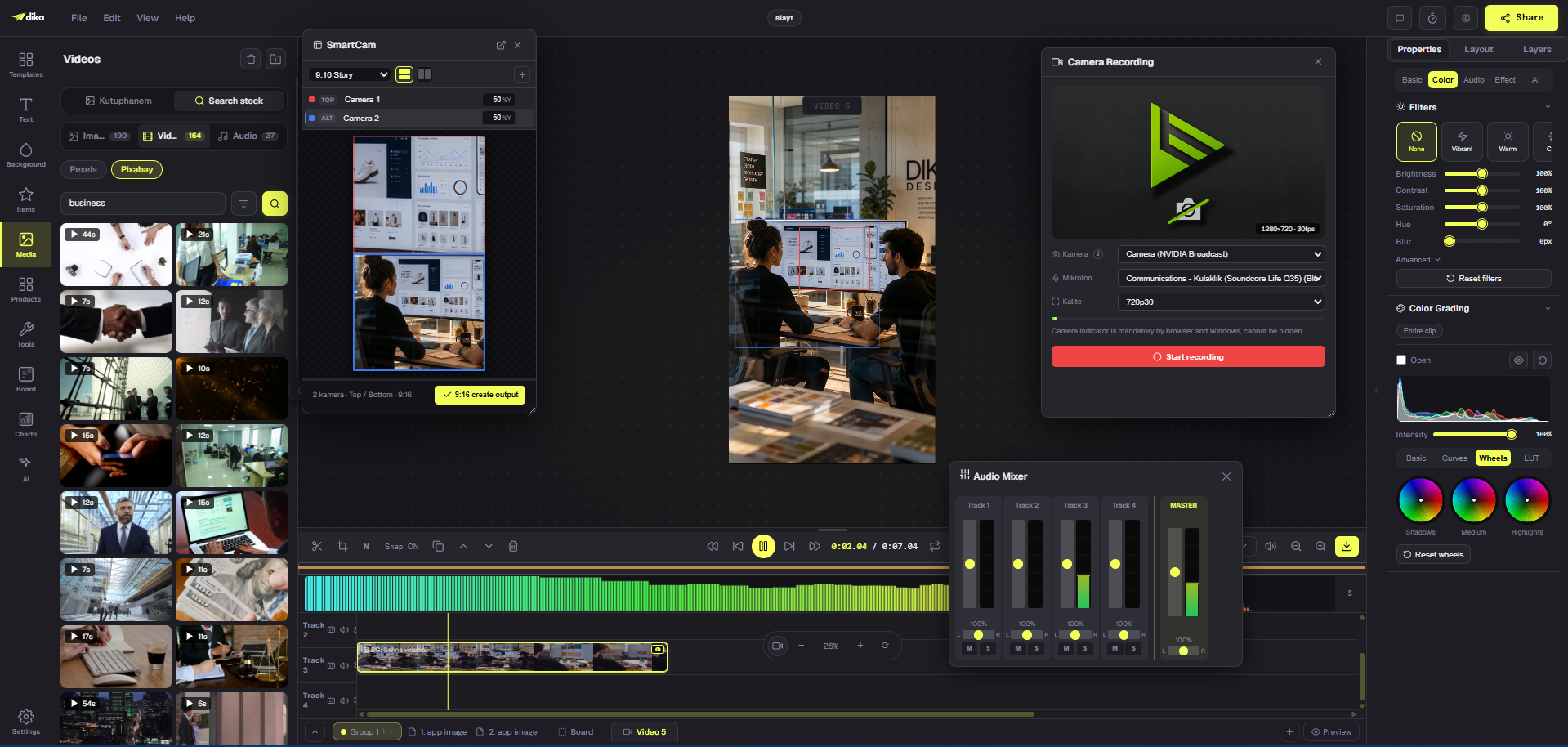
Community Editor keeps production fundamentals together: composition, pages, motion, media and export. Use desktop packaging for native file access or run the static browser build from a folder.
Editable canvas
Build layered designs across pages and scenes instead of flattening every decision.
Motion and timeline
Arrange clips, timing, sound and subtitles inside the same production surface.
Local project storage
Keep projects and media on your computer, then export project files for your own backups.
Practical exports
Finish still, document and motion work without sending the project to a render service.
Offline core
Open, edit and export without a permanent cloud connection or hosted workspace subscription.
Source you can inspect
Study, modify and self-host the editor under the Business Source License 1.1.
Choose your build
Desktop when you want files. Browser when you want zero setup.
Windows and Linux packages wrap the same editor in a desktop shell with native open/save support and an application data directory.
Windows · x64
Installer
Per-user setup. No administrator rights required for the default installation.
Linux · x64
Portable archive
Extract the archive and run the included dika-studio application.
Any modern browser
Static source
Clone or download the repository, then open the editor build directly from its files.
Why this edition exists
Made for local creative practice, learning and independent building.
Community Editor gives people a serious place to understand, adapt and use the production surface without first adopting an account, subscription or managed stack. It is a real editor—not a trial shell.
Product intent and software licence are separate: this edition is shaped for people who want the editor on their own machine, while the Business Source License 1.1 remains the authority for every permitted use.
Personal creative practice
A low-friction edition for learning, independent experiments and work you want to keep local.
A focused editor build
Canvas, media, pages, motion and export stay together without carrying the entire hosted platform.
Clear software boundaries
Local editor code, Dika trademarks and hosted services each keep their own terms and responsibilities.
One editor, two operating models
Local editing stays open. Connected production stays a service.
The community build and hosted Dika Studio share creative foundations. Their operating responsibilities are intentionally different.
Community Editor
Local production surface
Download the editor, keep project files under your control and operate the creative workspace yourself.
- Canvas, pages, scenes and timeline
- Local projects and user-controlled backups
- Inspectable source
- Local import and export workflows
Hosted Dika Studio
Connected production system
Use the full production layer with managed infrastructure, shared workflows and connected services already maintained.
- Managed AI models and provider-key workflows
- Skills, Recipes and community marketplace
- Accounts, permissions, billing and security controls
- Automation, shared assets and team delivery
Why AI Skills are not bundled into the desktop package: managed generation, reusable Skills and hosted automation rely on provider credentials, metering, secure workers, accounts and maintained infrastructure. Community Editor keeps the local creative core clear; Dika Studio supplies those connected services when a workflow needs them.
Licence, without ambiguity
The licence covers code. Dika identity remains protected.
You may run, inspect, modify and self-host Community Editor under the Business Source License 1.1, including for commercial work and for everyone in your organisation. What you may not do is offer the editor itself to third parties as a product or a hosted service, or embed it in something that competes with dika studio. Four years after each version is published, that version becomes AGPL-3.0.
Third-party components keep their own licences. Dika Studio names, logos and marks are not granted by the code licence, so public forks and derivative distributions need their own identity.
Read licence on GitHubBefore you install
Community Editor questions.
Is Community Editor free?
Yes, free of charge. The source is published under the Business Source License 1.1, so you can run, study, modify and self-host it, including for commercial work.
Is it limited to non-commercial use?
No. Paid client work, commercial projects and installing it for everyone in your organisation are all allowed, and whatever you make with it is yours. The limit is narrower than non-commercial: you may not offer the editor itself to third parties as a product or a hosted service, or build something that competes with dika studio. Four years after each version is published, that version becomes AGPL-3.0.
Why are AI Skills and hosted automations separate?
Those services depend on accounts, provider credentials, model billing, security controls, workers and maintained cloud infrastructure. Community Editor stays a focused local creative application; Dika Studio provides the connected service layer.
Does my work leave my computer?
Project documents, media and version history are stored locally. The official build may contact Dika for optional account, release and public-library surfaces described by the app; design contents are not uploaded as part of the offline editing workflow.
Can I publish a modified build?
Yes. You can publish a fork, and everyone who receives it gets the same licence and the same limits. Dika names, logos and marks are not part of the code licence, so public forks need their own identity.
Why can Windows show a warning?
Current desktop artifacts are unsigned. Windows SmartScreen may warn on first launch. Check the release notes and published checksum before running a downloaded build.
Start local. Connect when useful.